ocrreject_exam
Checks STIS CCD 1D spectroscopic data for cosmic ray overflagging.
Examples
In Python:
>>> import stistools
>>> stistools.ocrreject_exam.ocrreject_exam("odvkl1040", plot=True)
[{'rootname': 'odvkl1040',
'n_splits': 2,
'detector_box_fraction': 0.0068359375,
'n_cr_pix': array([11787, 11052]),
'n_total_cr_pix': 22839,
'extr_fracs': array([0.36021205, 0.36063058]),
'outside_fracs': array([0.00883899, 0.00813034]),
'combined_ratio': 42.479135678716936,
'combined_ratio_threshold': 1.4027214132251133,
'overflagged_stat': True}]
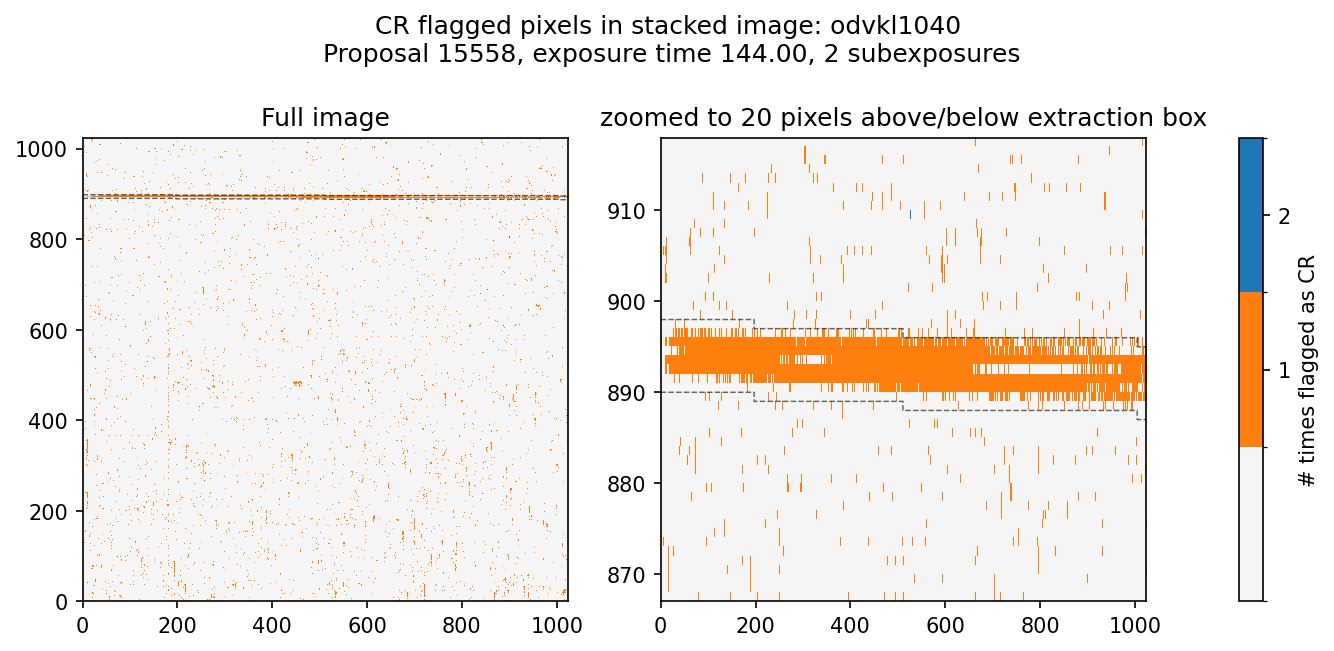
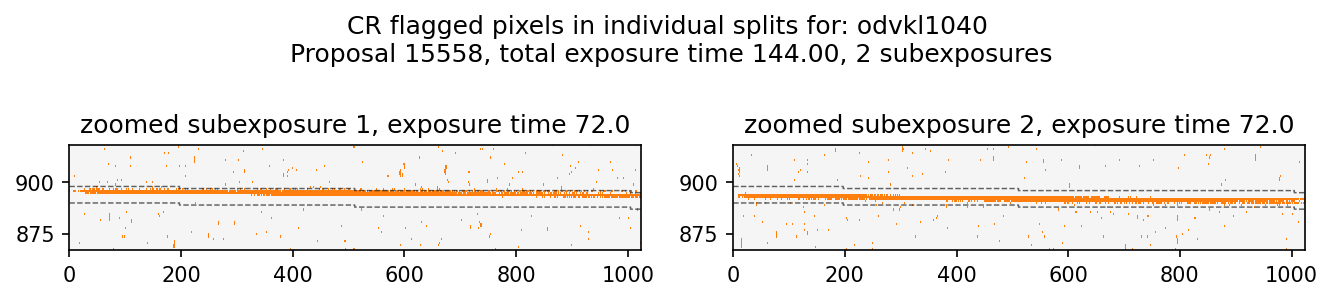
From command line:
ocrreject_exam -h
usage: ocrreject_exam [-h] [-d DATA_DIR] [-p] [-o PLOT_DIR] [-i] obs_id [obs_id ...]

Calculate fractions of cosmic ray rejected pixels inside and outside of an extraction box to test for CR algorithm failures.

positional arguments:
obs_id       observation id(s) in ipppssoot format

options:
-h, --help   show this help message and exit
-d DATA_DIR  directory containing observation flt and sx1/x1d files. Defaults to current working directory.
-p           option to create diagnostic plots
-o PLOT_DIR  output directory to store diagnostic plots if plot=True. Defaults to data_dir.
-i           option to create zoomable html plots instead of static pngs. Defaults to False and requires Plotly if True

v1.1; Written by Matt Dallas, Joleen Carlberg, Sean Lockwood, STScI, December 2024/ June 2026.
- exception stistools.ocrreject_exam.BoxExtended(message='Extraction box extends beyond frame')
- stistools.ocrreject_exam.call_ocrreject_exam()
Command line usage of ocrreject_exam
- stistools.ocrreject_exam.combined_ratio_threshold(all_ncr_pix, detector_box_fraction, alpha, cr_size)
Returns the largest combined ratio that can occur given a significance level alpha under the null hypothesis that the CRs are randomly distributed across the detector.
- Parameters:
- all_ncr_pix: int
The total number of cosmic ray flagged pixels across all splits.
- detector_box_fraction: float
The portion of the readout area taken up by the extraction box (probability for the inverse survival function).
- alpha: float
The desired significance level for determining if a ratio is likely to be due to overflagging.
- cr_size: float
The number of pixels each cr hit is assumed to impact.
- Returns:
- combined_ratio_threshold: float
The maximum combined_ratio that can be observed within the significance level.
- stistools.ocrreject_exam.ocrreject_exam(obs_ids, data_dir='.', plot=False, plot_dir=None, interactive=False, verbose=False, alpha=0.00135, cr_size=2.4, show_plot=False)
Compares the rate of cosmic rays in the extraction box and everywhere else in a CCD spectroscopic image. Based on crrej_exam from STIS ISR 2019-02.
Higher ratios of cosmic ray rates in the extraction box to the rest of the image may indicate the need to rerun stistools.ocrreject() with different parameters.
- Parameters:
- obs_ids: iter of str or str
One of more STIS observation ID rootnames in ipppssoot format (e.g. odvkl1040).
- data_dir: str
Directory containing both the flat fielded (_flt.fits) and extracted spectrum (_sx1.fits or _x1d.fits) files of the observation if using obs_ids argument. Defaults to current working directory.
- plot: bool
Option to generate diagnostic plots, default=False
- plot_dir: str or None
Directory to save diagnostic plots in if plot=True, defaults to data_dir parameter
- interactive: bool
Option to generate zoomable html plots using plotly if plot=True, default=False
- verbose: bool
Option to print the results discussed in STIS ISR 2019-02 to the terminal, default=False
- alpha: float
The desired significance level for rejecting the null hypothesis that the CRs are randomly distributed across the detector. Default=0.00135 from right tail of a 3 sigma probability.
- cr_size: float
The mean number of pixels each CR is assumed to hit. Affects the threshold ratio used to determine if the CR distribution is significantly different from random. Default=2.4.
- show_plot: bool
If True, when interactive=False show the generated plot in a notebook session in addition to saving. Default=False.
- Returns:
- results: list of dict
rootname: obs_idn_splits: number of splits in the observationdetector_box_fraction: fraction of the detector taken up by the extraction boxn_cr_pix: number of pixels flagged as CR in each splitn_total_cr_pix: total number of pixels flagged as CR across all splitsextr_fracs: cosmic ray rejection rates in the extraction boxes for each CR-SPLIToutside_fracs: cosmic ray rejection rates outside the extraction boxes for each CR-SPLITcombined_ratio: cosmic ray rejection rate inside the extraction box divided by the rate outside it, combined across all splits (avg_extr_frac/avg_outside_frac)combined_ratio_threshold: the maximum combined_ratio set by alpha under the null hypothesis of randomly distributed CRsoverflagged_stat: boolean indicating if the observation is likely overflagged set by alpha based on the combined ratio
- If called from the command line, prints the combined extraction, outside, and ratio values for quick verification similar to the older method shown in STIS ISR 2019-02 Appendix A (https://www.stsci.edu/files/live/sites/www/files/home/hst/instrumentation/stis/documentation/instrument-science-reports/_documents/201902.pdf).
- stistools.ocrreject_exam.split_plot(splits, box_lower, box_upper, split_num, individual_exposure_times, texpt, obs_id, propid, plot_dir, interactive, show_plot=False)
Creates a visualization of where CR pixels are in each subexposure
- Parameters:
- splits: list
list of CR flagged pixels in each subexposure
- box_lower: array
1d array of ints of the bottom of the extraction box (0 indexed)
- box_upper: array
1d array of ints of the top of the extraction box (0 indexed)
- split_num: int
Number of splits in the stack
- individual_exposure_times: list
List of exposure times for each subexposure
- texpt: float
Value of total exposure time
- obs_id: str
ipppssoot of observation
- propid: int
proposal id of observation
- plot_dir: str
Directory to save plot in
- interactive: bool
If True, uses Plotly to create an interactive zoomable html plot
- show_plot: bool
If True, show the generated plot in a notebook session in addition to saving. Default=False.
- stistools.ocrreject_exam.stack_plot(stack_image, box_lower, box_upper, split_num, texpt, obs_id, propid, plot_dir, interactive, show_plot=False)
Creates a visualization of where CR pixels are in a stacked image
- Parameters:
- stack_image: array
2d array to plot
- box_lower: array
1d array of ints of the bottom of the extraction box (0 indexed)
- box_upper: array
1d array of ints of the top of the extraction box (0 indexed)
- split_num: int
Number of splits in the stack
- texpt: float
Value of total exposure time
- obs_id: str
ipppssoot of observation
- propid: int
proposal id of observation
- plot_dir: str
Directory to save plot in
- interactive: bool
If True, uses Plotly to create an interactive zoomable html plot
- show_plot: bool
If True, show the generated plot in a notebook session in addition to saving. Default=False.